
Download DiffyPick
DiffyPick runs on macOS and Windows. (A Linux edition is in the works.)
The features are identical on all platforms.
macOS
Macs with the M1 chip or newer (late 2020 and later).
Download (.dmg)Intel-based Macs (2019 and earlier).
Download (.dmg)Not sure? Menu → About This Mac shows the chip name.
Windows
Microsoft Store edition
Microsoft signs and distributes the Store edition, so no SmartScreen warning appears. Updates go through the Store, so they may arrive slightly later.
Requires Windows 10 or later. It will be available here as soon as it lands on the Store.
Standalone installer (unsigned)
For anyone who prefers not to use the Store. Windows shows a SmartScreen warning at launch. Best if you want the latest release the moment it ships.
Standard Windows PCs with Intel Core or AMD Ryzen chips (most PCs).
Download (.exe)Windows on ARM devices such as Snapdragon-based PCs.
Download (.exe)Not sure? Settings → System → About shows "System type".
If SmartScreen warns you
This warning only applies to the standalone installer.
When you launch the installer, a red warning screen appears. Two clicks get you past it.
Depending on your Windows version and settings, the warning may appear in blue instead of red. The wording and the steps are the same.
Click "More info"
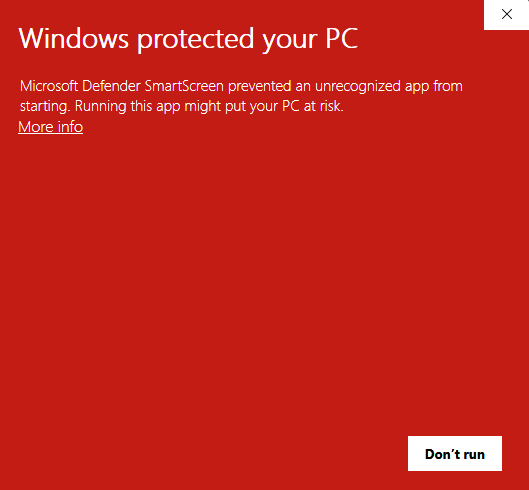
Click the "More info" link in the upper-left. At this point, only the "Don't run" button is visible.
Click "Run anyway"
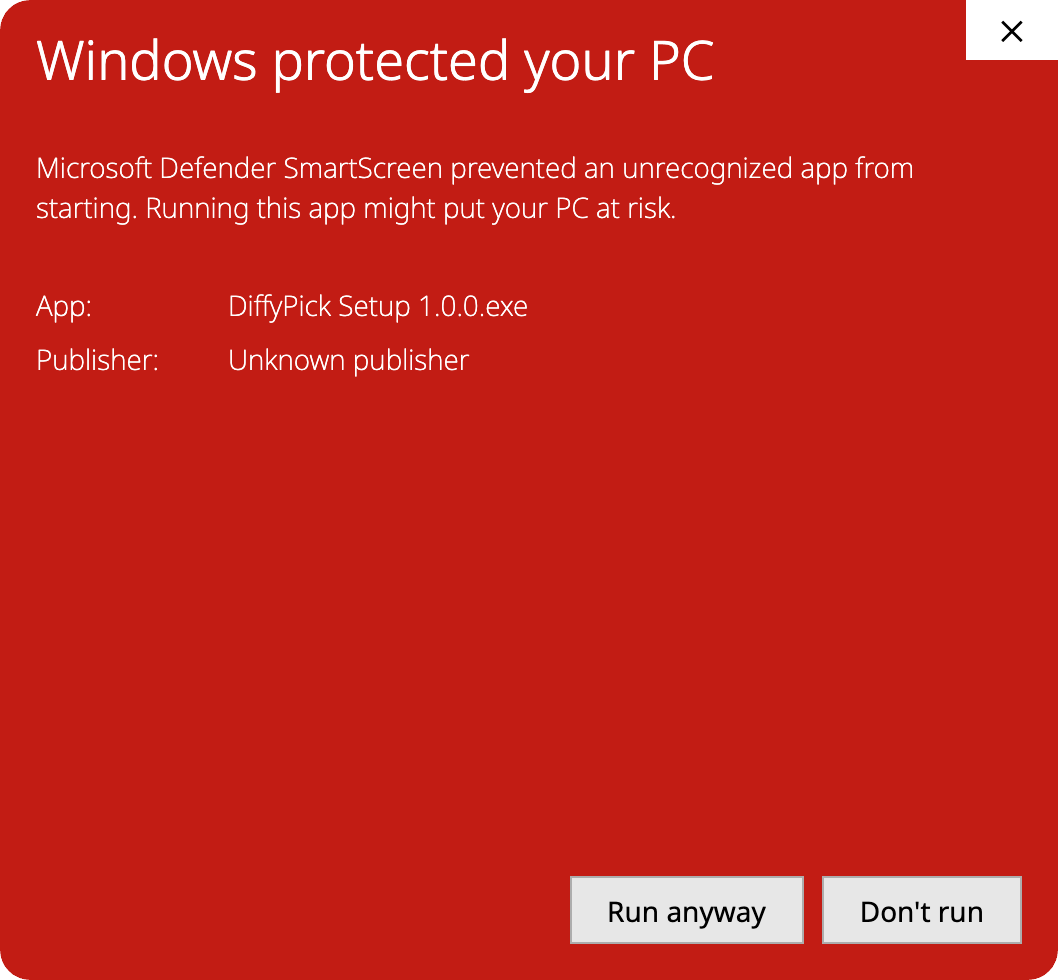
The app name (DiffyPick Setup) and publisher (Unknown publisher) appear, along with a "Run anyway" button in the lower-right. Click "Run anyway" to start the installer.
Not comfortable with the SmartScreen warning?
If you would rather not click through the warning, install the Microsoft Store edition instead. It is signed and distributed by Microsoft, so no warning appears. The app itself is identical in both editions. Note that the Store edition is coming soon — it will be available here as soon as it lands.
Coming soon